 Millworker
 Hardware Library
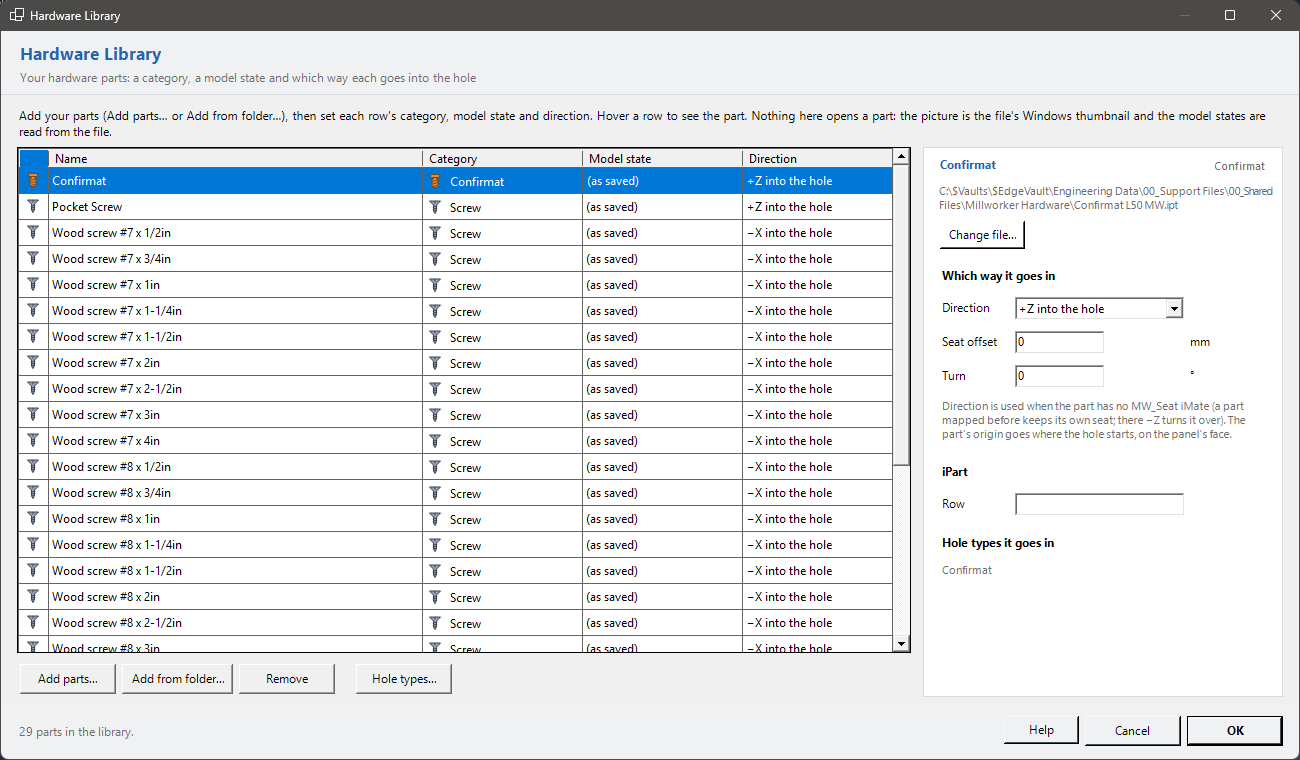
A simple list of your hardware parts: a category, a model state and which way each goes into the hole.
- Fasteners or Hardware panel → Hardware Library (also with nothing open), or Library… in Insert Fastener.
Your hardware parts (screws, Confirmats, dowels, hinges, inserts…), one row each. Hole types say which part goes in which hole; Insert Fastener and Place Hardware put them in.
Adding parts
- Add parts…: choose one or more .ipt or .iam files.
- Add from folder…: choose a folder; every part in it is listed to tick, its category guessed from its name (confirmat, dowel, hinge, screw, insert, nut, cam, pin, magnet, lock, handle…).
- Remove takes the selected rows out (the files are not touched).
The list
| Category | Screw, Confirmat, Dowel, Insert/Nut, Hinge, Cam/Connector, Shelf pin, Bolt, Handle, Magnet/Catch or Other. Its icon shows on the row and in the tools' lists. |
| Name | What the tools list. Blank: the file's name. |
| Model state | The model state placed (a cabinet hinge open or closed). (as saved) is the one the file was saved in. The states are read from the file. |
| Direction | Which of the part's own axes points into the hole: +Z, −Z, +X, −X, +Y or −Y. |
Hover a row to see the part. The picture is the file's Windows thumbnail: no part is opened, so nothing asks to resolve a link and nothing can crash.
Selected part
| Direction | As in the list. The part's origin goes where the hole starts, on the panel's face. |
| Seat offset | mm: moves the part along the hole; positive goes further in. |
| Turn | °: turns the part about the hole's axis. |
| iPart row | An iPart factory: the member to place (blank: the default row). |
| Hole types it goes in | The hole types whose fastener this part is. Hole types… opens them. |
A part that already has an MW_Seat iMate is seated by it; there −Z turns it over. An iPart member from another library whose factory is not on this PC (for example one from W4INV) can't be placed by Inventor: Millworker saves a standalone copy beside it (name MW.ipt, the original untouched) and uses that.
Stand-ins
Place Hardware puts a plain purchased part shaped from the hole's sizes in a tagged hole with no part in the library, made once in the Millworker Hardware folder. Its Part Number is the hardware's name, so the BOM counts them and the cut list leaves them out.
OK saves the library in Millworker Hardware.json next to the material database. A library from before keeps working.