Millworker
Help / Drawings
 Update Labels
Drawing
Re-letter every section and detail from sheet 1, and name views FRONT VIEW, SIDE VIEW, PLAN VIEW.
Where
- Any drawing. Millworker tab → Sheets panel → Update Labels.
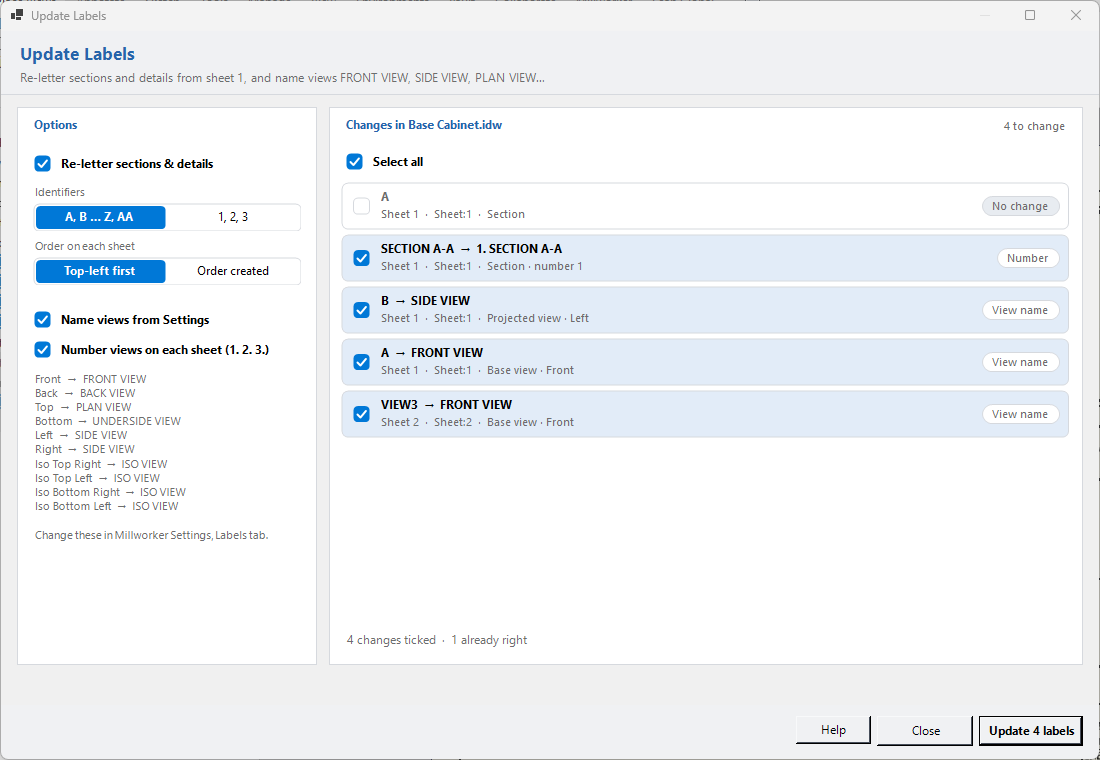
Every change is listed before anything happens; untick any you want left. The lot is one undo step.
- Re-letter sections & details: numbered through the drawing from sheet 1, so a section added to an early sheet later still comes out as A. Choose letters (A, B … Z, AA) or numbers, and whether each sheet runs top-left first or in the order the views were made. Leaving one out keeps its letter, and the rest run on without a gap or a clash.
- Name views from Settings: base and projected views get the label for the way they look (Front, Top, Left, an iso…) from Millworker Settings, Labels tab. Only the label's first line changes; the scale line stays. Untick it when you don't want view names touched.
- Number views on each sheet: every view with its label shown gets a number in front of its title, 1. FRONT VIEW, 2. SECTION A-A, 3. THIS CUSTOM TITLE, in the sheet's order (top-left first, or the order made); each sheet starts again at 1. Untick it and Update Labels takes the numbers off again, and only the numbers: 1. THIS CUSTOM TITLE becomes THIS CUSTOM TITLE. A section's letter stays live in its title.
Rows already right show No change and can't be ticked. The choices are remembered, and are also in Millworker Settings, Labels tab, under Update Labels does: update view names, letter or number sections and details (SECTION A-A or SECTION 1-1), and number the views on each sheet.
Screenshot placeholder
images/update-labels.png
1100 × 760 px
Update Labels open over a drawing: options on the left, the list of changes (A to B, FRONT VIEW) on the right.