 Millworker
 Millworker Settings
Default sizes for the tools, tool units, and the shared material database folder.
- Millworker tab → Settings panel → Millworker Settings. On every ribbon.
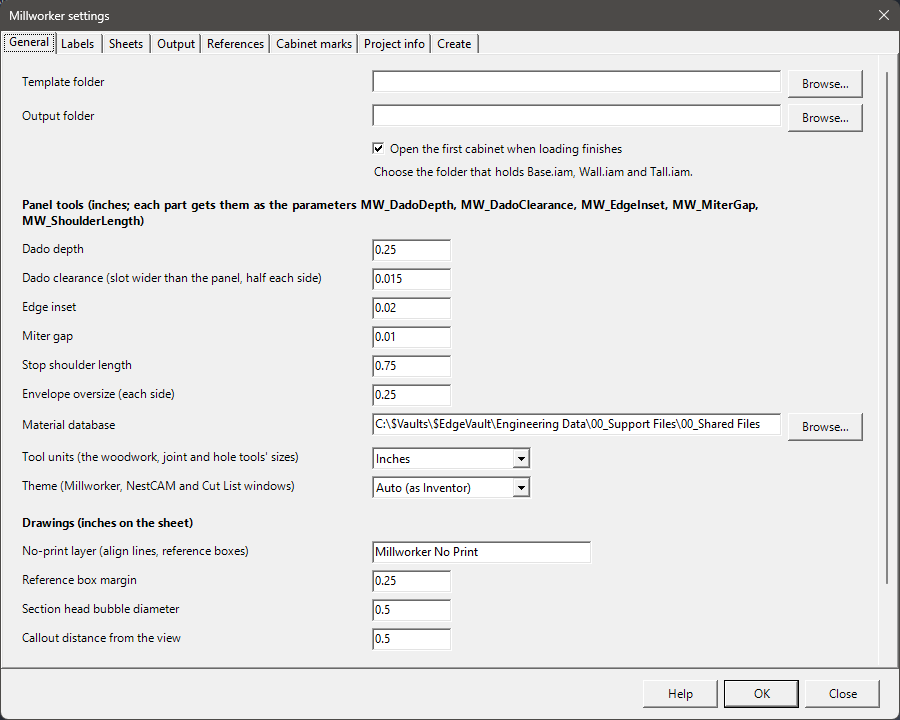
| Setting | Default | What it does |
|---|---|---|
| Dado depth | 0.25 in | Starts MW_DadoDepth in a part that has none. |
| Edge inset | 0.02 in | Starts MW_EdgeInset, used by Edge Inset. |
| Miter gap | 0.01 in | Starts MW_MiterGap, used by Miter Join. |
| Dado clearance | 0.02 in | Starts MW_DadoClearance: a slot is cut this much wider than the panel that fits in it, half on each wall, so the panel is not a press fit. 0 puts the walls right on the panel. |
| Stop shoulder length | 0.75 in | Starts MW_ShoulderLength, used by Stop Shoulder. |
| Envelope oversize | — | The oversize on each end and side a new Waste Envelope gets. |
| Tool units | Inches | See Tool units. |
| Theme | Auto (as Inventor) | The look of the Millworker, NestCAM and Cut List windows: Auto is light or dark as Inventor's theme is; Light or Dark sets it. The same colours as CabinetCAD's windows. A window takes a change the next time it opens. |
| No-print layer | Millworker No Print | The layer the drawing tools' align lines and reference boxes go on. Made in the drawing the first time (red, dashed) when it has none of that name, and always set not to plot. |
| Reference box margin | 0.25 in | How far a reference box stands out from its view, on the sheet. |
| Section head bubble diameter | 0.5 in | The size of a section line's head bubble on the sheet; its arrow and the tail are sized from it. |
| Callout distance from the view | 0.5 in | How far a drawing callout's boxed note sits out from the side of its view. |
| Material database | — | The folder that holds Millworker Materials.db. Put it on a shared drive so every PC uses the same materials, edgebands, edge profiles, functions and hardware library. |
| Textures folder | — | The folder of texture and finish pictures (a shared drive, say). The Material Manager keeps a picture from it by its path inside it, so after a move, set the new folder here and the pictures are found again. NestCAM and CabinetCAD use it too. |
| Template folder, Output folder | — | Used by CabinetCAD's cabinet templates (Base.iam, Wall.iam, Tall.iam). |
More tabs: Labels, the label each ViewCube view gets from Update Labels; Sheets, the drawing template and sheet layouts the Drawing Builder uses (drag the layouts into sheet order, tick the ones the builder makes, and set what each is Used for; the layout editor places views, a parts list and a revision table), the sheet index table style and the sheet name format; Output, the Drawing Output profiles; References, for Reference Tables: the projects root and workbook name, the template workbook new workbooks start from, a table style for each group, the optional groups (Panels, Metal, Glass, Purchased), I use Vault (only then do the messages say to get or check out the workbook in Vault), Use INNERGY (only then does Millworker look materials up in INNERGY, check them against it, and take thickness from micValue; unticked, it works from the Material Manager alone) and your INNERGY email and API key (kept on this computer, encrypted, shared with InvInnergy); Cabinet marks, the Cabinet Marker types; Project info, the iProperties Project Info fills in and pushes down; and Create, the projects root, how new project, work order and file names are made, and the template for each kind of file Create makes.
Changing a value in an open part
The settings seed parameters in a part that has none yet. When you click OK with a part open and its MW_DadoClearance differs, Millworker asks, names the old and new value and sets it in that part (one undo step); every slot follows. Other parts keep their own value until they are open and Settings is OK'd again.
The tools' own Settings… buttons (Dowels, Hinge Holes, Shelf Holes and the fasteners) hold their own sizes; those are covered on each tool's page.