 Millworker
Help / Getting started
Install and update
Install Millworker, switch it on in Inventor, and where its files are kept.
Install
- Close Inventor completely.
- Run the Millworker installer [installer name and download link to come with licensing]. It puts the add-in in
C:\ProgramData\Autodesk\ApplicationPlugins\Shaw Dev\Millworker\, where Inventor 2026 and 2027 both find it for every Windows user on the PC. NestCAM and CabinetCAD go beside it inShaw Dev\NestCAM\andShaw Dev\CabinetCAD\, and their settings and logs are kept inShaw Dev\Data\, so installing again never touches them. - Start Inventor. The Millworker tab appears on the ribbon when a part or assembly is open.
Screenshot placeholder
images/install-addin-manager.png
900 × 640 px
Inventor: Tools tab > Add-Ins. Millworker selected in the list, Loaded/Unloaded and Load Automatically ticked.
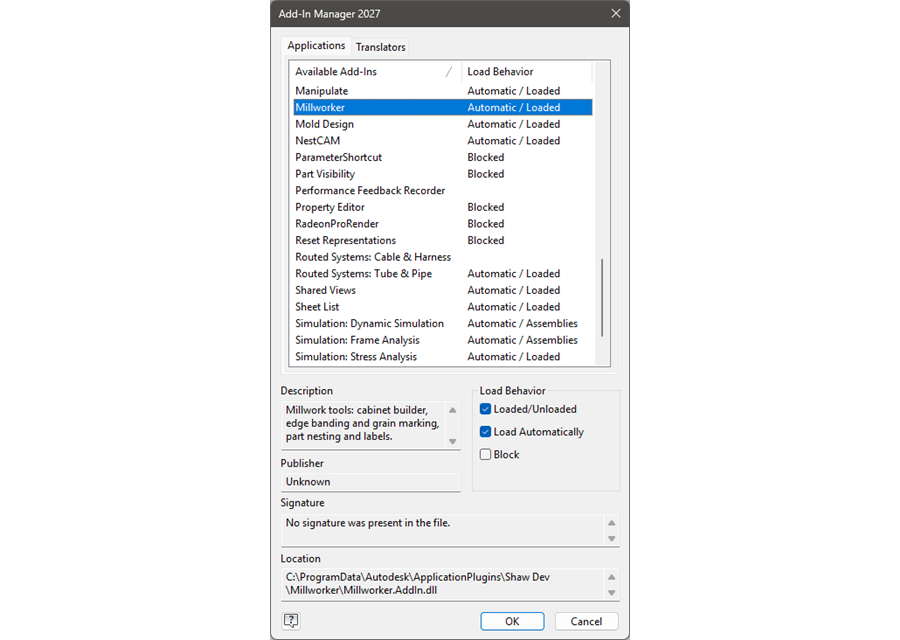
If Inventor once failed to load Millworker it may leave it switched off. Open Tools → Add-Ins, select Millworker and tick Loaded/Unloaded and Load Automatically.
Update
Close Inventor, run the new installer, and start Inventor again. Inventor locks the add-in's files while it runs, so an update cannot go in while Inventor is open. Your settings and data are kept.
Where Millworker keeps things
| What | Where |
|---|---|
| Settings | C:\ProgramData\Autodesk\ApplicationPlugins\Shaw Dev\Data\Millworker\settings.json. NestCAM and CabinetCAD read it from there, and keep their own in Data\NestCAM and Data\CabinetCAD. |
| Error log | C:\ProgramData\Autodesk\ApplicationPlugins\Shaw Dev\Data\Millworker\error.log: send it with any support request. |
| Materials, edgebands, finishes, veneers | Millworker Materials.db and its Images folder, in the material database folder (Settings). |
| Edge profiles | Millworker Edge Profiles.json, next to the material database. |
| Formula functions | Millworker Functions.json, next to the material database. |
| Hardware library | Millworker Hardware.json and the Millworker Hardware stand-ins folder, next to the material database. |
| Marks, nodes, formulas | Inside each part or assembly file, as attributes: they travel with the file. |